

How can teams prioritise well?
How do you hear every voice?
How can you use in-person and virtual tools?
Here, red10 ‘s Will Sudworth, assisted by AI, shares practical and proven approaches to enable teams to review a portfolio of workstreams or assets with clarity, speed and shared ownership.
Why seek wisdom from the web?
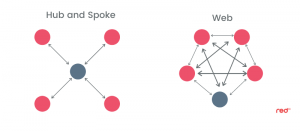
At red10 , many teams talk about “the team web”: the idea that insight, expertise and lived experience are spread right across the group rather than concentrated in the centre. If a leader relies only on a hub-and-spoke pattern; where information flows to and from one or two central people, much of the team’s wisdom remains unused. Decisions then become slower, narrower and less resilient.
A team web, in contrast, taps the collective perspective. When everyone contributes, you reveal blind spots, spot patterns and accelerate commitment. That is why portfolio reviews thrive when you hear from more than just the usual few.
For a deeper explanation of this idea, see red10 ‘s article: Hub and Spoke vs Web
What exactly are you reviewing?
Portfolio reviews appear in many forms. You might be a drug development team assessing assets at different clinical stages. You might be a leadership team balancing a handful of workstreams, each led by a different colleague and supported by its own sub team.
In every case, a key question arises: who owns the entire picture?
If only the asset leads understand their slice, the portfolio becomes fragmented. When the whole team steps back to view all workstreams together, something powerful happens: people make better trade-offs, understand interdependencies, and spot duplications. They support colleagues rather than compete with them. The portfolio becomes shared territory rather than a set of separate islands.
How do you run this in-person?
A high-impact way is to make the portfolio visible—literally. On a large A1 or A0 poster, or using big sticky notes on a wall, display each workstream or asset. The physical scale encourages people to stand, move and think together.
Introduce the Five-Colour 5S Coding:

Explain what each colour means and why you are using them. Decide whether contributions remain anonymous or whether people sign their name on each sticky for follow-up. Both approaches work; anonymity can increase candour, naming can support clarity and accountability.
Then invite one sticky per person, per asset or workstream.
You quickly create a multi-coloured pattern that acts as a traffic-light snapshot of the portfolio’s health. A cluster of red or orange notes signals concern. Blue shows appetite for acceleration. Yellow highlights uncertainty or the need for sorting discussions.
What happens next depends on your aim:
A. You can gather the output and analyse it offline.
B. You can make key decisions in the room and take the remainder away.
C. You can walk through each asset or workstream in turn. The relevant lead gives a short guided tour, then invites colleagues to turn the colour feedback into shared actions. This approach strengthens team ownership and increases commitment to the next steps.
How do you run this virtually?
The virtual version mirrors the in-person method almost exactly. Instead of paper stickies, use a digital whiteboard tool such as Mural® or Miro®.
Each asset or workstream becomes a virtual tile. Participants place coloured digital stickies—again one per person, per item. You still get the clear traffic-light effect.
There is one crucial pivot point:
once everyone has placed their stickies, take a screenshot.
This freezes the data, preventing the board from becoming too busy as you shift into discussion mode.
Then switch to a shared-screen conversation, using the screenshot as your reference point. At this stage, the chat box becomes vital. In virtual meetings, not all voices emerge easily through audio alone. Encouraging the chat box enables faster contributions, broader participation and a richer team web—capturing ideas from those who think quietly, process visually, or prefer to refine their thoughts before speaking.
You can then follow the same three options as in the room:
review offline, decide immediately, or invite each workstream lead to guide the group through the meaning behind the colours.
What makes this approach work?
Teams value structure when making complex decisions. The five colours offer a shared language. The visual layout makes patterns obvious. And the combination of stickies, screenshots and chat box input ensures everyone contributes—strengthening insight and commitment.
Above all, this method turns portfolio reviews from a narrow discussion into a genuinely collective conversation. It brings the team web to life.
If you’d like this adapted for your team or portfolio, red10 would love to help.