

Are you enhancing your team effectiveness?
Already know about web vs hub & spoke?
Curious about how to set individual goals in a web-like way?
Here, red10 ‘s Will Sudworth – assisted by Perplexity.ai – describes a team tool to facilitate individual goal-setting in a team.
Does the team want to be like a web?
Before we share this team tool, there’s a prerequisite: that the team wants to work mainly as a web, rather than hub & spoke.
If you don’t have time to click into the above article, here’s a summary from AI:
Web Structure
In a web structure, all team members are interconnected and work collaboratively. This setup encourages shared responsibility, open communication, and collective problem-solving. It’s ideal for teams that value flexibility and adaptability.
Hub & Spoke Structure
In contrast, a hub & spoke structure centralizes decision-making and communication around a single point (the hub). While this can streamline processes, it may limit collaboration and innovation.
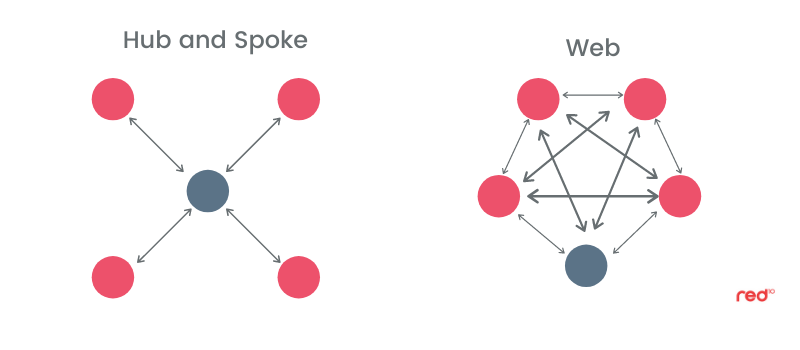
To say the obvious: if the team wants to work hub & spoke, then not only do they not need this team tool – it will annoy them. If the team wants to work in the web, then they will love this tool, and it will help them be more than the sum of their parts.
The physical version of this team tool
Setting up the gallery
- Prepare a goal-setting template: Design a template that helps team members articulate their goals clearly. It’s good to include the what-why-when-who. It’s very helpful to include: “Obstacles include anything rate-limiting”. It is also helpful to include a section on “Requests to team”.
- Ask each team member to propose their goals: Have each member fill in the template with their proposed goals.
- Print out their goals on a large poster: Use A1-sized posters for each team member to ensure visibility.
- Create a gallery: Choose a room where you can display all the posters. You can either attach them to the wall or use easels with card-backed posters.
Facilitating the physical gallery
Rinse and repeat these steps:
A. 5 Mins: Goal owner gives a guided Tour: Allow each goal owner to explain their poster without interruption.
B. 5 Mins: Team feedback: Each member provides a sticky note with a question, suggestion, or encouragement.
C. 5 Mins: Team Leader discussion: The team leader summarizes the comments, highlights the most important ones, and provides coaching or steers.
Post meeting
- Goal owner’s next steps: Each goal owner agrees to process all feedback and the team leader’s steers, then share a revised version (v2) by a specific date.
- Team Leader’s next steps: The team leader agrees to share all agreed member goals with the full team by a specified date.
The virtual version of this team tool
Setting up the gallery
- Prepare a goal-setting template: Same as above
- Ask each team member to propose their goals: Same as above
- Shared slide set: Compile all goals into a shared slide set, such as on SharePoint.
Facilitating the virtual gallery
Rinse and repeat these steps:
A. 5 Mins: Goal owner gives a guided tour: Each goal owner presents their goals via video or screen sharing.
B. 5 Mins: Team feedback: Each member provides a minimum of one comment via the Chatbox with questions, suggestions, or encouragement.
C. 5 Mins: Real time summary and discussion: he goal owner can use AI to summarize comments in real-time. The team leader helps highlight key points and provides coaching.
Post meeting
The process remains the same as the physical version.
Overall timing? Variations are possible…
For the full process, budget about 20 minutes per person. For a shorter version:
- Limit the guided tour to 3 minutes
- Jump straight to discussion: Have the team leader discuss with the goal owner while team members provide feedback in parallel.
Using a tablet with a timer can help manage time effectively. It can also be engaging to create a friendly competition by tracking how long each goal owner takes to present, displaying it on a leaderboard. A bit like how UK TV show Top Gear created a competition of racing car lap times.
Summary
In summary, this team tool is designed to enhance collaboration and goal alignment within a web-like team structure.
By leveraging both physical and virtual environments, teams can foster a culture of open communication, shared responsibility, and collective achievement.
The process encourages active participation, feedback, and continuous improvement, ensuring that each member’s goals contribute to the team’s overall success.
Can this help you?
Implementing this team tool can be a transformative step for any organization seeking to boost team effectiveness and cohesion. By embracing a web-like structure and focusing on collaborative goal-setting, teams can unlock their full potential and achieve more together than they could alone.
Whether you’re working in a physical or virtual setting, this approach offers a flexible and engaging way to align individual goals with the team’s broader objectives, leading to a more harmonious and productive work environment.