

Are you in virtual meetings that are “all talk”?
Do you find it easier to explain using a drawing?
As part of the Tools in our FREE VIRTUAL KIT, red10 ‘s Will Sudworth shows how to show your iPad drawings on Zoom®.
Bag of Tools & Techniques

If you find this article useful, have you seen our Free Facilitator’s Kit for Virtual Meetings ?
This article is one of the Tools in our 3Bs Virtual Kit – Basics, Behaviours and Bag of Tools to help leaders facilitate great virtual meetings. There are advanced tools that you may be interested in too, such as Breakout Rooms and Annotations for prioritizing
Requirements
To be able to draw on your iPad, and show it on a Zoom® screen you need:
- Essential: An iPad compatible with an Apple Pencil
- Essential: Your iPad to be on the same WiFi as you’re the PC you are using for Zoom®
- Optional: The iPad app Notability provides extra features, but you can use the built in Notes
7 Steps to show your iPad drawings on Zoom®
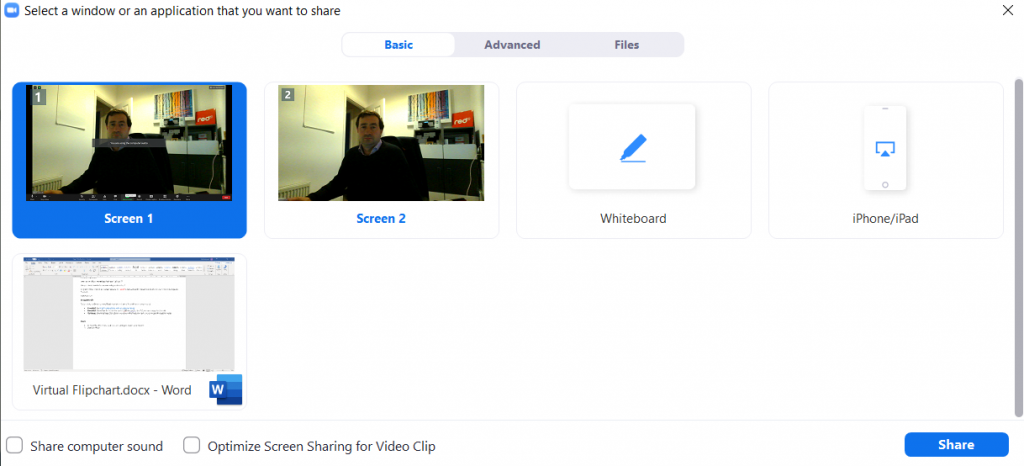
In Zoom®, click Share Screen

Choose iPhone/iPad and click share
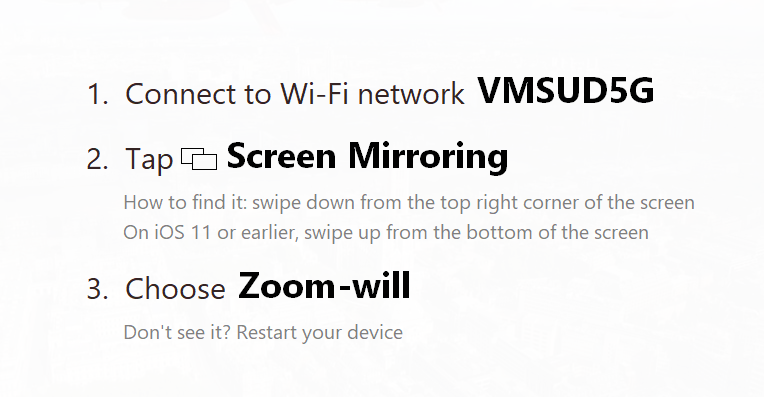
(Zoom will instruct you to connect your iPad to the same WiFi network )
On your iPhone or iPad:
Open the note taking app on your iPad
Swipe down from the top right-hand corner of your iPad screen

Choose Screen Mirroring
Choose Zoom-X where X will be your name
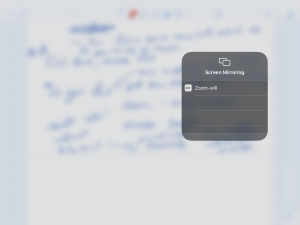
Zoom will now be sharing the note taking app on your iPad screen, allowing you to explain your point with a drawing.